


Monster Trucks Game for Kids 2
4.11.36K Reviews
App Specs
- Version
- 3.5.4
- Updated On
- License
- Free
- Downloads
- 100,000,000+
- Developer
- Raz Games
- Categories
- Educational
- Platform
- Android, iOS
Screenshots
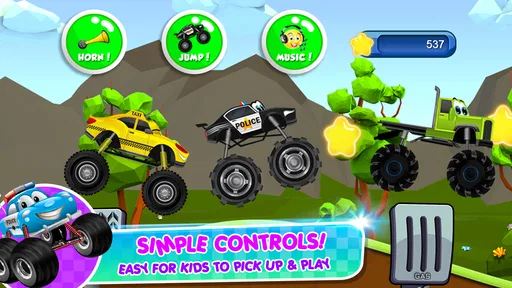
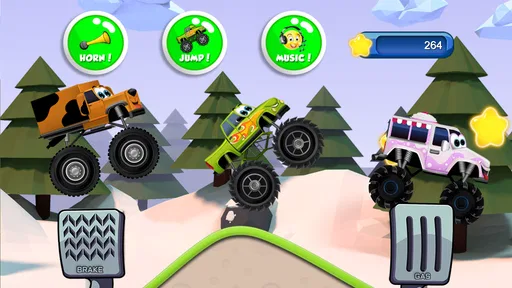
 Analysis by AppCompare
I judge a children’s game partly by what happens after the first burst of excitement. A bright truck and a quick race can win a child’s attention once; the harder test is whether it stays enjoyable as a familiar choice without turning into a chore for the child or an obligation for the adult. Monster Trucks Game for Kids 2 is best approached as a small, focused racing game for young players, rather than an educational course or a long-term hobby that needs daily attention.
What the first few sessions get right
The appeal is easy to understand: monster trucks are the whole point, and the game puts young players in the driver’s seat quickly. The visual style is colorful and playful instead of realistic, so the action feels light. That makes it a more comfortable introduction for a child who likes vehicles but may not enjoy the speed, visual intensity, or competitive pressure of a more grown-up racing game.
In the first week, I’d use it in short turns rather than presenting it as an activity that needs a long session. A child can try a course, get used to steering and accelerating, and decide whether to play again. The short-race format is useful in ordinary gaps in the day: while waiting for a meal, during a quiet break at home, or as a brief activity before moving on to something else. It is easier to fit into family life when the expectation is one quick round, not an open-ended stretch of screen time.
The controls are approachable, but a grown-up may still need to help at the start. A young child can understand the basic idea of driving before being able to coordinate every input reliably. I’d sit beside them for the first attempt, show how the controls respond, then let them take over. That small introduction can prevent the game from being mistaken for a frustrating one if their first run goes off course.
Keeping it in the rotation
Monster-truck themes can hold a child’s interest, and the option to choose among different-looking trucks gives them a simple reason to make the game feel like their own. That kind of choice is appealing, but I would not treat it as deep customization or assume that collecting vehicles will keep every child engaged indefinitely. For a child who enjoys repeating a favorite activity, familiar tracks and the chance to do a little better can be enough. A child who needs a steady stream of new challenges may move on sooner.
That distinction matters when deciding whether this belongs on a device for the long haul. The game makes the most sense as one item in a small rotation: a vehicle game for a child who likes driving, alongside other activities that offer a different pace or kind of play. It is not a substitute for varied learning apps, shared play, or hands-on toys. Its educational value is modest and practical: coordinating movement with what is happening on screen, noticing obstacles, and trying another route or attempt.
For a useful everyday routine, I’d let the child choose a stopping point before opening the game. For example, an adult can agree that the child will play a short turn while waiting, then hand the device back when that moment is over. This keeps the game from becoming the default answer whenever a child is bored and makes it easier to judge whether they are still enjoying the races or simply asking for more screen time out of habit. That is a family choice, not a special feature of the game.
Worth Reading Before You Choose

Baby Panda World Brings Quick Play to Modern Phones, but Its Game Library Feels Busy

ESPN’s Live Game View Makes Following Close Games Easier

QuizzLand Review: A Good Fit for Short Trivia Breaks, Not Every Player

Basketball Stars: Multiplayer Is Fast, but Can It Recover When Matches Go Wrong?

WEBTOON Turns Phone Updates Into a Better Reading Routine

Link to Windows Runs on Shared Habits, Not Social Feeds
What parents should weigh
It is a free game from Raz Games, with optional in-app purchases priced from $0.99 to $3.99 per item. I’d make the purchase decision before handing the device over, and set the device’s purchase controls in a way that suits the household. A child may not distinguish between an in-game option and a purchase prompt, so an adult should be nearby if the child is exploring menus. Free to download does not mean every possible item is included without payment.
The age rating is Everyone, but that is not the same as a recommendation that every child can use it independently. Younger players may need help with steering, device handling, or understanding when to stop. The game is aimed at kids and toddlers, yet the best fit depends on the child’s coordination and interest, not just their age. If a child gets upset when a run goes badly or finds the controls hard to manage, I’d pause and try again later rather than pushing through.
Another practical consideration is the setting in which it will be played. The game’s engine sounds and crash effects are part of its appeal, but repeated sound effects can become tiring in a quiet room or on a shared device. Lowering the device volume before play is a simple way to make it easier to use in a waiting area or around other people. I’d also keep an eye on how the child holds the device while steering, since a control scheme that feels natural in a relaxed seat may be less comfortable when they are moving around.
How it compares with other choices
Compared with a general early-learning app, this game is narrower and more immediately playful: the focus is driving monster trucks, not moving between a broad set of lessons. Compared with a more complex racing game, it asks less of a young player and keeps the presentation child-friendly. That is a useful middle ground for a child who wants to race but is not ready for elaborate controls or a more competitive experience. If your priority is structured lessons, varied educational subjects, or realistic racing depth, I’d choose a different kind of app instead.
The game’s educational label should be understood in that limited sense. A child may practise hand-eye coordination and simple decision-making while playing, but I would not expect it to teach a specific school subject or replace an adult-led activity. The strongest reason to choose it is that it gives a young vehicle fan a straightforward way to play. The learning is a possible side benefit, not the main reason I’d keep it installed.
The Thrill of Monster Trucks
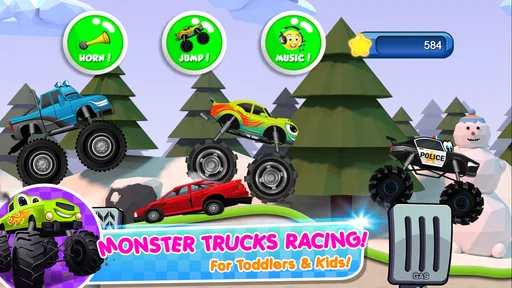
First up, let’s talk about the aesthetics. The game is visually vibrant and colorful, perfect for grabbing the attention of the little ones. The graphics aren’t hyper-realistic, but they’re not meant to be. Instead, they’re playful and engaging, with that cartoonish charm that keeps things light and fun. It’s an ideal mix for kids who love action without the intensity of more mature racing games.
Gameplay Mechanics
Now, on to the gameplay. Monster Trucks Game for Kids 2 is designed with simplicity in mind, making it incredibly accessible for young players. The controls are straightforward – tap to accelerate, and tilt to steer. This simplicity ensures that even the youngest drivers can navigate the tracks without getting frustrated.
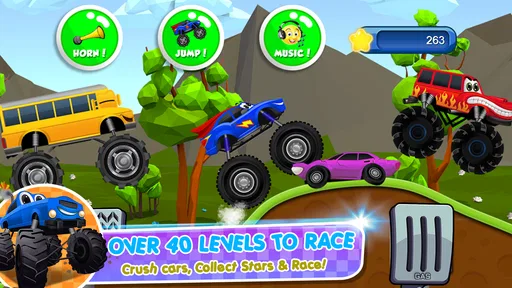
Each level is a short burst of excitement, with ramps, obstacles, and other monster trucks to compete against. The levels are varied enough to keep things interesting, and the difficulty curve is gentle, which is great for keeping kids entertained without overwhelming them.
Fun Features to Explore
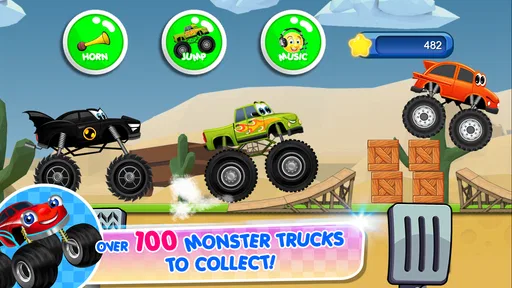
What I love about this game is the variety of monster trucks available. Kids can choose from a selection of brightly colored trucks, each with its own unique design. This customization adds a layer of personal expression, which is always a hit with young gamers.
The sound effects are another highlight. From the roaring engines to the satisfying crunch of cars being flattened, the auditory experience is just as engaging as the visual one. It’s like having a monster truck rally right in your living room!
Learning and Development
Beyond the fun, Monster Trucks Game for Kids 2 also sneaks in a bit of learning. It helps with the development of hand-eye coordination and fine motor skills as kids learn to maneuver their trucks through the courses. Plus, the game encourages problem-solving as players figure out how to overcome obstacles and reach the finish line.
There’s also a nice element of reward with the collection of stars and trophies. This can be a great motivational tool, encouraging kids to keep trying and improving their skills.
Wrapping It Up
At the end of the day, Monster Trucks Game for Kids 2 is a delightful mix of fun and learning that’s sure to bring a smile to any child’s face. It’s not just a game; it’s an adventure on four giant wheels. If you’re looking for a way to combine entertainment with a bit of skill-building, this game is definitely worth a download.
So, if you’re ready to watch your kids tackle thrilling tracks and build their confidence behind the wheel, head over to your app store and give it a spin. Your little ones will be revving their engines in no time!
A sensible fit for the right child
Its broad reach suggests that many families have tried it: it has over 100 million installs, an average rating of 4.1 from around 103,000 ratings, and about 1,400 written reviews. Those figures can help establish that it is a familiar choice, but they cannot tell me whether a particular child will enjoy the controls or the repeated races. I’d treat them as background, then let the child’s response during a brief first session guide the decision.
The game is free and is rated Everyone, which makes trying it relatively straightforward, while the optional purchases are a reason to prepare the device before a child plays alone. It was released in May 2016, and version 3.5.0 requires Android 6.0 or later. Those details matter if you are checking an older Android device or deciding whether the game is likely to suit the device already set aside for a child. The developer is Raz Games.
One useful way to judge whether it has lasting value is to watch what the child does after the initial novelty wears off. Do they choose a truck and happily repeat a course, or do they need an adult to keep prompting them? Do they remain calm when a run does not go as planned? A child who enjoys practising and can stop without a struggle may get steady value from it in occasional short sessions. If interest fades quickly, there is little reason to turn repetition into a routine.
Keeping play comfortable over time
For a toddler, I would make the first sessions shared rather than assuming the child can manage the game alone. An adult can help with holding the device, explain the goal in simple terms, and notice whether tilting to steer feels natural. As the child becomes more confident, you can step back while staying close enough to help with a confusing moment or a request to make a purchase. This gradual handoff is more useful than treating the age label as proof of independent readiness.
For a preschooler who already enjoys toy cars, the game can work as a digital extension of that interest, especially during a short wait when carrying a toy is inconvenient. I would still alternate it with offline play. A child can build a track from blocks or race toy vehicles on the floor, activities that invite different kinds of movement and imagination. The screen version is convenient, but it cannot provide those same physical and social experiences.
It may also help to keep the game in a predictable place in the household routine rather than offering it whenever a child asks for a screen. A brief turn after a necessary wait is easier to manage than using it as a reward for every completed task. This is not a claim that the game encourages a particular habit; it is simply a practical way to keep any quick-play activity from crowding out other things the child enjoys.
When repetition helps—and when it wears thin
The same compact design that makes the game accessible can limit its appeal for children who want a lot of variety. A young player may enjoy familiar courses and the satisfaction of handling the truck more confidently, while an older child may want more strategic choices, a broader range of activities, or a stronger sense of progression. I would not keep it installed solely because it has educational value if the child no longer chooses it willingly.
Likewise, it is not the best pick for a child who dislikes tilt controls, becomes frustrated by steering, or wants a slower activity with no racing pressure. In those cases, a drawing app, a simple puzzle, or an adult-guided activity may be a better match. For a child who wants more involved racing, an age-appropriate game with richer controls may be more satisfying, provided its complexity and content suit the family. The right alternative depends on whether the child needs calmer play, more learning variety, or more challenge.
In the end, I see this as a low-commitment option rather than a game that needs ongoing maintenance. There is no reason to build a daily schedule around it, and a child does not need to unlock a long sequence of achievements for the app to have served its purpose. Keep it available if the child returns to it happily and the adult can manage purchases and stopping time comfortably; remove it or set it aside if the novelty has passed. Its lasting place is earned through occasional, cheerful use, not through the size of its audience or the promise of learning.
Pros
- Engaging graphics and animations.
- Simple controls for young children.
- Variety of monster trucks available.
- Encourages creativity and exploration.
- No ads interrupting gameplay.
Cons
- Limited educational content.
- Repetitive gameplay may bore older kids.
- In-app purchases required for full access.
- No multiplayer options available.
- Requires internet for some features.
FAQs for Monster Trucks Game for Kids 2
What is the age range suitable for Monster Trucks Game for Kids 2?
Monster Trucks Game for Kids 2 is designed for children aged 2 to 8 years old. It offers simple controls and engaging animations that are perfect for young kids. The game focuses on fun rather than competition, making it suitable for early childhood development and interactive learning.
Does Monster Trucks Game for Kids 2 require an internet connection?
No, Monster Trucks Game for Kids 2 does not require an internet connection to play. Once downloaded, all features and levels are accessible offline, making it a great option for entertaining kids during travel or in areas without reliable internet access.
Are there any in-app purchases in Monster Trucks Game for Kids 2?
Yes, the game includes in-app purchases. While the basic version offers plenty of content, additional trucks, tracks, and features can be unlocked through purchases. Parents can manage these purchases through device settings to ensure children don't accidentally buy extras.
What educational benefits does Monster Trucks Game for Kids 2 offer?
The game promotes hand-eye coordination, problem-solving, and cognitive development through interactive gameplay. Children can learn about different vehicles and terrains, enhancing their understanding of cause and effect, spatial awareness, and basic physics in a fun environment.
How do I ensure my child’s safety while playing Monster Trucks Game for Kids 2?
Monster Trucks Game for Kids 2 is designed with child safety in mind. It features a child-friendly interface and does not contain ads that lead to external sites. Parental controls can be used to manage screen time and oversee in-app purchases, ensuring a safe gaming experience.


